Showing posts with label game. Show all posts

September 1, 2010

my new game will be published

thanks for your comments ,

as soon as I'll  publish my java 3d  game

and some discussion about games and developing

  send your comment about that what you want from mobile game

and which games you like and  are you played games in mobile or no.

wait  for your comments
Read more »

August 22, 2010

codes for touch in iphone

Every user should control game easily. Game controlling can be doing with  keypress
or touch or device(in iphone and some device).Which one you like?In iphone or even
java you should use events for every user command .In  this article we  focused on
touch events and codes.

a touch can be occurred in interface that i discussed in previous article. For any touch
and interface you should define function and connection from interface to function.
if you want use button button have many touch event like touch cancel,touch
down,touch up inside and etc.With right click in button in mainwindow you’ll see
events, select one of them and connected it to window select function you create for 
button.like this image


For other part of windows you shoul add more code .A code like it can be use
- (void)touchesBegan:(NSSet *)touches withEvent:(UIEvent *)event {
}
with this code you can define point for your touch .
CGPoint  lastPoint;
and in part of program that you can use it for detect your finger.
CGPoint gamePoint = [touch locationInView:self.view];
you can get coordinates of point.
x=gamePoint.x;y=gamePoint.y
in next post we discussed detailed about game making and also i’ll add more source code.
Read more »

August 7, 2010

using interface in opengles (part 1)

in this tutorial  i’ll describe opengles template that using in game developing and add interface to it.You can use text and image and etc without any coding in iphone games.Just for more change in text and images in during  game you need coding. first we create new project in Xcode and select opengles template like this image

opengl  

then select name for project .i select “test” for my project you can select another.

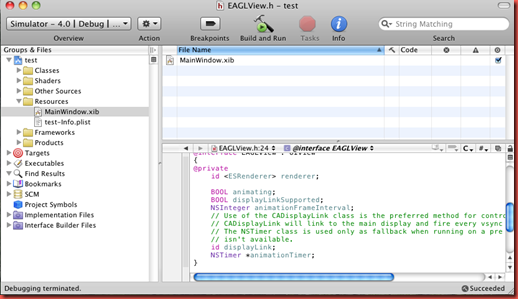
Xcode opened window like this image for you that you see test project and folders of it.

testproject

As you see test have 6 folder (classes,shaders,other sources,resources,frameworks and products).In resource you can see MainWindow.xib (is main topic of post).Select window .You can add some text and images and other library .see this image

window

In opengles codes forced some change in main window after run it.With any code you

can change interfaces also .after run your program you can see this window like it.

labelopengl

i add label(my game 1)to opengles sample project that you see.you can chage font and size of text and others that you want.

Read more »

May 11, 2009

blender and python and game

blenderis a free 3d open source code.in blender you can run a python code and access to object and rotate and scaled and transform
them .you can first make figure in poser and then import it on blender or 3ds max.for import any poser figure it is better to select unimesh demo in python script box and make a sample demo from figure and then import it to 3ds max or blender.then you can create a code like this

# Windows version
import Blender
import sys

obj=Blender.Object.Get()
print str(obj)
sys.stdout.flush()

and run it on blender.you can custumize code with loop and others and make a game with it
Read more »

April 23, 2009

3d animation and game

from today i want change my blog topic from java game programming to 3d animation and game.
because a best way to make games is that make good animation and run it with code in java or other programming language .from today i start my work in this subject .
be wait...
Read more »

February 25, 2009

ultimate fight 3d java game

in this version you can fight as iran,us,german,france,spain,......in place iran us, france,china ....
watch it here


and download it from
http://www.esnips.com/web/ultimatefight

gamepicture1
Hosted by eSnips

Read more »

February 24, 2009

animation and sound in 3d games

for this purpose you should use synchronized function for synchronized animation and sound with

your events occurred when key pressing.for Synchronize any functions you should use synchronized word before you functions this function is used for play mp3 sound
public synchronized void playmusic(String file)
{
if(sound==0)
try
{
Player p = Manager.createPlayer(file);
p.setLoopCount(5);
p.start();
}
catch(IOException e)
{
System.out.println("Error in io : " + e.toString());
}
catch(MediaException e)
{
System.out.println("Error in media : " + e.toString());
}
}
you should add this function in function that you want played syncronized .
public void keypress()
{
playmusic(file);
}
for animation you can make any arbitary function like this
syncronized void animation()
{
x++;
group.setTranslation(x,y,z);
}
this function force to moving a group in x axis without stop!
this was a sample way for animation and sound in java 3d game.
Read more »

February 17, 2009

download ultimate fight 3d 0.1 (my new game)


sorry for my late. i worked in my new game.this is ultimate fight 0.1.this game is in testing and contain a one level and two player now but this will be enhanced as soon as.in this video you can see game in snaps.

watch it

and download it from here
download it
Read more »

October 18, 2008

sample tips in making mobile game:graphics 1

tips1:
When you making a mobile games you should know that you can't make full city or even building

and textured them.Because it forced to have bigger 3d models and some mobile device's(or all of

them!).In this case you can textured your desired city or building or...in sample plane or cube

and move camera toward them. in game it seems that you moved in real city or building but you

moved to image .Then you can add your game sample building and humans and creatures to other

side of pictures.like below


this is my video
Read more »

September 5, 2008

steps in making real 3d game

1.moving
moving of objects in 3d game is an important step in games and you should have good control in moving light and cameras .Camera position is on base of your game strategy and your game algorithm.for example in this test game(i'm still beginner) I set camera position with this code.
cam.postRotate(45, 0, 1,1); cam.setTranslation(xpos+40, ypos-50, zpos+60);
and you'll see camera in front of girl and above of her head when she moving near house.
in this video you will see how camera move(xpos,ypos,zpos is girl position in 3d place)


another method for moving is using transformation and transform matrix . a transform matrix is a 4 X 4 matrix and in java code you write it as float array with this code
float[] matrix={1,0,0,sx
,0,1,0,sy
,0,0,1,sz};


Transform m=new Transform();
m.set(matrix);
now for moving camera and human in x axis(1 unit) set sx=1 .If you have mesh with name human and camera you need only to this code for moving them.
camera.setTransform(m);
human.setTransform(m);
With setting sy and sz you can moving in y and z axis

.Matrix transform is very good for rotation and scale also. In next post i show how you can moving human with rotate hand and leg and body.This game also need a sample algorithm for moving girl .

You can download game for playing from this link
download
(sorry for some problem in exit and speed it was my first game)
Read more »

August 4, 2008

Advanced programming II: images and text

Advanced programming II: images and text

Now we want focusing on making better game. For better game we need some text for showing score and some images for maps and other thing and at last a better graphics for getting your game more reality .

In design of 3d models you need getting texture from building and objects that you want to use in game. Some texture maybe force to distortion your model and even maybe you can’t see anything. And of course more high graphics texture and models may not be seen well in some old phone. For example when you download this game for p990 sonny erricson you see a picture like it


But when you want to download it for k750 from same company (sonny ericsson) you will see some graphics problem and maybe even you can’t see some models in older phones.

Add text and images and some functions

You can add text and images to your games with Graphics class and bind Graphics3D to it .You should add text and images to graphics after bind it to Graphics3D . it is an example code

g3d.bindTarget(graphics,true,Graphics3D.ANTIALIAS|

Graphics3D.TRUE_COLOR);

g3d.render(_world);

g3d.releaseTarget();

graphics.setColor(0x990000);

graphics.setFont(Font.getFont(Font.FACE_SYSTEM, Font.STYLE_PLAIN, Font.SIZE_LARGE));

graphics.drawString("corner", 90, 150,

Graphics.TOP | Graphics.RIGHT);


In first code we bind target graphics(from Graphics class) to g3d(from Graphics3D) and in second line we render my world class . After release your g3d object you can change your graphics object and add image or add text .For add text I use three line for set color and font and text.

Add images is like that and only you need add function drawimage and image object to your code.This image can be maps or character picture or other thing.You can add some function also to your program for controlling move of cameras or objects in your game.I add a sample code for this porpose.

if(y>-20)

Y=-20;

With this code camera will be stopped if it reached to left wall.In 3ds max wall y position was 20 and

Camera will be moved to Y with this code

camera.setTranslation(X, Y, Z);

You can see more in this project


download project
Read more »

July 24, 2008

Using pointer: download A sample pointer enabled killer game

I add a sample project for more discuss in light and cameras. it is only a camera moving in between walls(textures are from internet).I'll add gun and other effects to it in next time.You can also edit 3d model in way you want. This is my model in 3 direction:top,camera,left and perspective


This model have a camera and 3 light and you should draw your model on base of your camera(upper right picture) and if you want use another cameras also you should configure your model on base of them. In this model camera id is 14 and for loading camera in program this code is enough

Camera camera;

Camera=(Camera)(Myworld.find(14));

Camera position in this model is your person eye.You can move camera in every place with this code

m.setTranslation(x,y,z);

For example you can move it with pointer with this code

protected void pointerPressed(int x, int y) {

m.setTranslation(x,y,z);


}

Pointerpress is a function that invoked when a pointer pressed and x,y is pointer location in screen .You can say that when pointer pressed (x,y) location in screen camera can move.you can add image and text to game for this purpose also. In next post i add text and image to this project for getting better result from this project.

Download project

Read more »

July 9, 2008

Download and develop your 3d java game mobile

For starting in programming with netbeans first I upload a sample java mobile game project that you can download it and run it or change it and even make a new game.

3d model making

1-for starting programming first you should have 3d model maker .this software should can export models to m3g.I using 3ds max 2008 but you can also use any 3d software like blender and a m3g exporter with it.Blender and m3g exporter are free.Maya is another good software for it but is not free.Every box and sphere you create in this software ,have an id in m3g that give you access to them and You can rotate and move this object .Graphics of this model maybe have some problem in

Some phones on base of their graphics.

Netbeans project information

2. After make your 3d model and export it now you are ready for programming .you should export your 3d model to subfolder "src\res" from your project folder .

My game engine is panel1 class and game canvas is "Canvas" and middle is hellomiddlet. 3ds model is in res folder (game1.max)with m3g file and you can change this model in way you want.your project name in netbeans is your project folder(unzip file after download) and you jar file is in dist folder.You can run it from mobile .In next post I'll explain my project functions and cods and models.

About functions and code

Panel1 class have two functions setmeshpositions and movemesh.setmeshpositions (15,35,35,35) means that your object with id 15 is positioned in 3 dimension space in xyz coordinate(x=35,y=35,z=35) and movemesh(15,"up",5) moving your object with id 15 to up direction in 5 unit.For example in this code

int state = getKeyStates();


if( ( state & DOWN_PRESSED ) != 0 ){


panel.movemesh(15, "up", 5);

state value is 1 when your using a key(in otherwise is 0) or no and DOWN_PRESS value say that you pressed down or

no and if two of them are true mesh move up 5 unit in up direction.you can change this code with replace up with down or like that.in next post I'll write some more about this codes and functions.

Download project now

Read more »

June 20, 2008

java mobile game programming

nowadays mobile game's are popular in world.why?Because mobile user's are increasing and ofcourse their user are different. from child's to young , from businessman's to unemployed people's .But everyone need game and music's for some funs in their tiring times specially young people's. In past time's game are limited in mobiles.Because Mobiles have limited memory and graphics but todays mobile have more memory and graphics and we can make better game .New game have 3d model's and high quality sound's that give user real world .Our focus in this blog is in 3d java game programming in mobile and how do it.I'm waiting for your comment about this blog and which content you need for mobile programming.
Read more »