Showing posts with label interface. Show all posts

August 12, 2010

using interface in opengles(part2: functions)

In this parti’ll describe how you can run your interface on base of  game objects move.

Every code for running your game main windows,should be added in EAGLVIew class.

in opengles is better that you add more windows to games for performing menus and

games and etc but in this project it isn’t necessary .In project that we build before you

know that  ES1Rendere and ES2Renderer class have code for render engine in

opengles1 and opengles2 .All new Iphone device support opengles2.

Now we want control speed of colored box (see in previous project).we  add two lable

and  button to windows like this image

setspeedwin

Now we define two function increasespeed and decreasespeed and a lable with name label in EAGLView class.in EAGLView.h inside interface we add UILabel *label ;

then add

- (IBAction)increasespeed:(id)sender;
- (IBAction)decreasespeed:(id)sender;

after  interface definition Then linked two button + and – to them..Now we add some code in function .for example for decreasespeed function we add this code(is same for increasespeed )

   - (IBAction)decreasespeed:(id)sender {

label.text=@"increase";
    speed+=0.15f;
     [renderer setspeed:(speed)];
     [renderer render];// is necessary for seeing change

}

setspeed is function that should defined in ES1Renderer and ES2Renderer and

ESRenderer.in ES1Renderer and ES2Renderer after interface defination add

-(void)setspeed:(int)Speed; . do it for ESRenderer after @protocol defination.

Now in ES2Renderer.m and ES1Renderer.m add following code

-(void)setspeed:(int)Speed
{
    speed=Speed;
}

it is all you need. now see your app!


setspeedapp

Read more »

August 7, 2010

using interface in opengles (part 1)

in this tutorial  i’ll describe opengles template that using in game developing and add interface to it.You can use text and image and etc without any coding in iphone games.Just for more change in text and images in during  game you need coding. first we create new project in Xcode and select opengles template like this image

opengl  

then select name for project .i select “test” for my project you can select another.

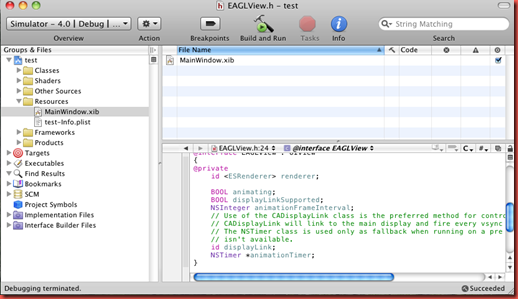
Xcode opened window like this image for you that you see test project and folders of it.

testproject

As you see test have 6 folder (classes,shaders,other sources,resources,frameworks and products).In resource you can see MainWindow.xib (is main topic of post).Select window .You can add some text and images and other library .see this image

window

In opengles codes forced some change in main window after run it.With any code you

can change interfaces also .after run your program you can see this window like it.

labelopengl

i add label(my game 1)to opengles sample project that you see.you can chage font and size of text and others that you want.

Read more »

August 3, 2010

Introduction to iphone programming

Xcode is  best tool for Iphone and Ipad and Mac programming.You can used so
many interfaces  easily in programming and connect them to source as you
want also with simulator for test your apps.see here for more info.In this picture
you see xcode 3.2.3 ide with iphone sdk 4.0
xcode3.2.3

Every project in Xcode at last have one windows(or view) .In windows we can
add some library like button,label,slide and…For this purpose we should
expand resource folder in left sidebar and open MainWindow.xib or
MainView.xib .Interface builder tool opened and show a blank window.It is
same windows that you see in iphone app. next drag your library from right
side to your windows . If you can’t see library should select tool menu and
then library.
interfacebuilder
Now build and run your apps .In next post I'll describe opengles tempelete that
is best choose for create 3d games for Iphone .and show how using interface
builders and codes in Xcode. 
yourapp1
Read more »